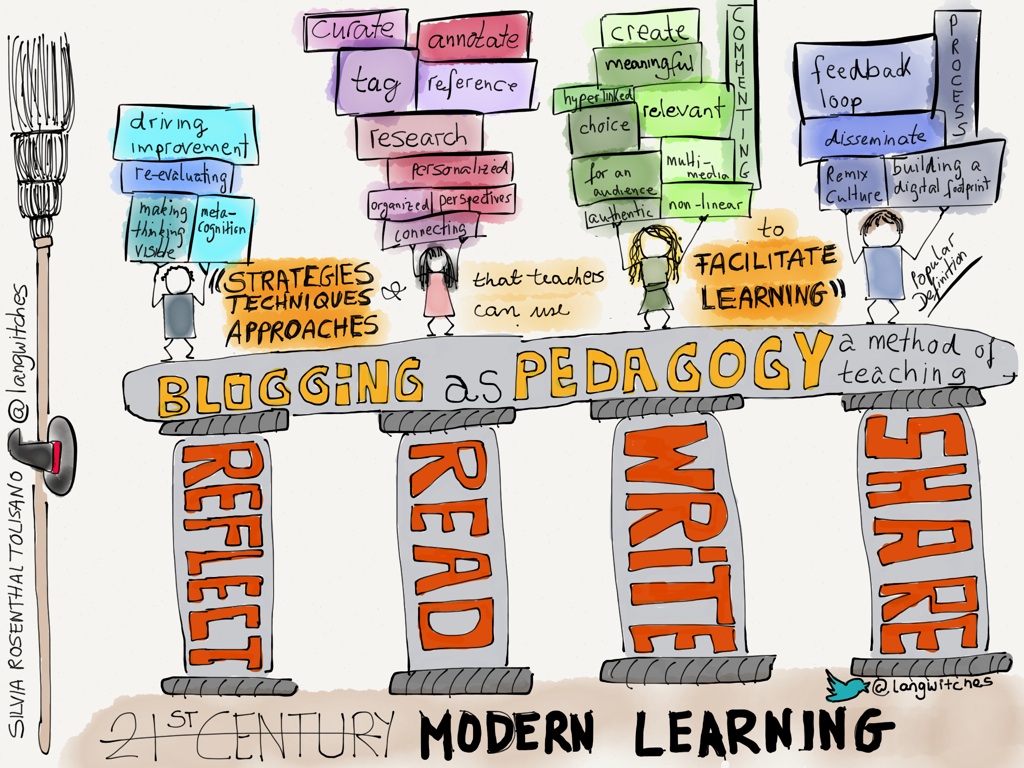
Why you need to consider blogging as a pedagogy to facilitate learning

Silvia Rosenthal Tolisano

I was inspired by a blog post written by Silvia Rosenthal Tolisano (known as @langwitches on Twitter) which begins by saying

“Blogging should not be an add-on, not an isolated project, but should be seen as PEDAGOGY”

It made me consider my approach to blogging, something I have developed only in the last 4-5 years. I now have a collection of blogs I write, each serving a different but valuable purpose. Continue reading


Posted in Blogs | Tagged | Leave a comment

Social Enlightenment: What enterprise wide use of social business ‘could’ look like

Social Enlightenment infographic

Image source: Jive Social

Click on the image to enlarge

“Overcome the suffering that email, legacy systems, and archaic processes bring. Let go of your frustration with not finding answers. There’s a path to enlightenment for every part of your company.”

This infographic from Jive Social is a lovely visual way to demonstrate how different parts of a company or organisation can do things differently taking a social approach. Continue reading

Posted in Social Media | Tagged | Leave a comment

Is there truth in the psychology of colour or is it simply down to personal taste?

colouring pencils

Image source: Wikipedia

How we use any of these colours in our lives can be very personal. From the way we dress, decorate our homes or even prepare food; we each may have different preferences to colour combinations. What pleases one person’s eyes can be a total turn off for another!

The Logo Company have put together an infographic on the emotions colours convey and aligned these with famous brands and the design of their logos. They say:

  • yellow = optimism
  • orange = friendly
  • red = excitement
  • purple = creative
  • blue = trust
  • green = peaceful

Continue reading

Posted in Blogs | Tagged | 2 Comments

Introducing Tweet Chats

Tweet Chat

So what’s a Tweet Chat?

A TweetChat is a virtual meeting or gathering on Twitter to discuss a common topic. The chat usually lasts one hour and will include some questions to stimulate discussion.  In order to be able to view tweets relating to the chat, a pre-agreed hashtag is shared. A hashtag is a word or series of letters and/or numbers preceded by #. For example:

#LTHEchat = Learning and Teaching in Higher Education Chat

#BYOD4Lchat = Bring Your Own Devices for Learning

By including the chosen hashtag within all Tweets relating to the chat, it is then easy to view just those Tweets by simply searching for #LTHEchat (or your own chosen hashtag) using the search bar in Twitter.

search

Tweets containing this hashtag will then appear in your timeline below. Continue reading

Posted in Twitter | Tagged | 4 Comments

Getting Started with Twitter

Getting Started with Twitter

Below is a screencast outlining 26 tips for getting started with Twitter. The slides can be accessed via SlidesShare here and downloaded. They have a Creative Commons licence so may be re-used with credit.

Screencast [slides with voice over]

Posted in Twitter | Leave a comment

How to create lists in Twitter to organise those you follow into groups

Twitter lists

Creating lists is a way to filter the tweets you read into topics.  Currently when you view your timeline you will see Tweets from everyone you follow, along with retweets. Wouldn’t it be nice to zoom in on Tweets from specific users? Creating lists can help you do this. It’s a bit like creating folders in Word to organise your saved files. Continue reading

Posted in Twitter | Tagged | 5 Comments

Some simple steps to ensure your Facebook privacy settings are as you want them

Facebook privacy check up
I received the message below when I logged into Facebook. It was a useful prompt to check my privacy settings, something we should ALL do at regular intervals.

Are you aware that you can make the choice to share your posts and other information just with friends you are connected to – that is the people you are friends with. If you do not check these settings you may find that you are sharing your information publicly. This means anyone can see your updates and profile. Continue reading

Posted in Facebook | Tagged | Leave a comment

Extending your reach beyond the conference using SlideShare and Social Media

ripple

Over the years I have attended a good number of educational conferences. The usual format will include one or more keynote speakers and a selection of workshops and presentations. For many of these, presenters will prepare a set of presentation slides using PowerPoint, Keynote or Prezi. As a frequent presenter myself I am aware that my audience is limited to the people attending that particular session. You may choose to provide handouts or send the presentation file to the conference organiser who may add this to the conference website. The issue here is that handouts are not guaranteed to see the light of day again by the individual who took a copy, let alone anyone else. Having a link to your presentation file on the conference website my receive a few hits, but post conference I suspect not many will re-visit. What you can do however is to use social media to share your work. Continue reading

Posted in Communication tools, LinkedIn, Social Media, Twitter | Tagged , , | 1 Comment

Every little minute helps: Using Chrome to auto launch your most visited sites on start up

time

When you turn on your computer, it is likely that you will have a few favourite websites that you like to look at each day. Now whilst it doesn’t take that long to type in the web address for each one, there is a quick way to save these and have them open up automatically on start up using Chrome as your browser. Continue reading

Posted in Tips | Tagged | Leave a comment

Using social media for learning, teaching and research

We want our students to

  • develop confident face to face and online communication skills
  • work collaboratively both synchronously and asynchronously
  • develop a professional online presence
  • use digital tools responsibly and effectively

To help our students develop these skills and knowledge we need to have clear pedagogic outcomes, embedding opportunities for them to learn and become fluent in a range of digital literacies. Information, media and technological fluency are all important. Continue reading

Posted in Social Media | 1 Comment