Hypothes.is is a free social annotation tool which allows users to discuss, collaborate, organise your research, or take personal notes. Annotating can be public and open to anyone, confined to small groups or used by individuals.
What does the Hypothes.is software do?
The elevator pitch is easy.
“Visit a web page, then select some text and annotate with comments or tags. You’ll see those annotations when you return to the page, and so will other Hypothesis users.”
The software leverages annotation to enable sentence-level critique or note-taking on top of news, blogs, scientific articles, books, terms of service, ballot initiatives, legislation and more. It has been summarised as “a peer review layer for the entire Internet. Continue reading →
Referencing and citation is an important part of any writing. This post looks at some recommendations and consideration when citing social media. Citations have several important purposes:
to uphold intellectual honesty (or avoiding plagiarism),
to attribute prior or unoriginal work and ideas to the correct sources, to allow the reader to determine independently whether the referenced material supports the author’s argument in the claimed way,
and to help the reader gauge the strength and validity of the material the author has used. (Wikipedia)
At Sheffield Hallam University (SHU) the Guide to Referencing offers detailed guidance for producing citations and references according to the Harvard method in the Harvard-SHU style recommended by the library. You may be asked to use another method, or a variation of the Harvard style. If this is the case, you may wish to refer to guidance that matches this style. However the recommendations below provide useful pointers to consider when citing social media and personal communications. Continue reading →
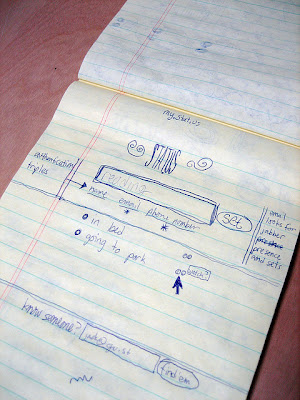
Co-founder Dorsey sent the first tweet, on March 21, 2006 which said “Just setting up my twttr”. You will note that the original name for Twitter was Twttr.
(Image source: https://www.flickr.com/photos/jackdorsey/182613360/)
To date the Twitter logo has had three iterations. Initially when Twitter launched in 2006, the Twitter bird did not feature at all. This was introduced in 2010 alongside the written name.
July 15, 2006 – September 14, 2010.
September 14, 2010 – June 5, 2012.
June 5, 2012–present
However in 2012, Twitter as a brand were firmly placed as one of the top social media alongside the likes of Facebook. The bird had become synonymous with Twitter and the decision to drop the text and just use the bird as the logo was made. The Twitter bird also lost it’s quiff, has fewer feathers and looks up with an open beak. For me this current iteration symbolises that Twitter empowers all users to have a free and open voice.
“Our new bird grows out of love for ornithology, design within creative constraints, and simple geometry. This bird is crafted purely from three sets of overlapping circles — similar to how your networks, interests and ideas connect and intersect with peers and friends. Whether soaring high above the earth to take in a broad view, or flocking with other birds to achieve a common purpose, a bird in flight is the ultimate representation of freedom, hope and limitless possibility.”
The video demonstrates both simplicity and clarity. Twitter says the new bird is “crafted purely from three sets of overlapping circles — similar to how your networks, interests and ideas connect and intersect with peers and friends.”
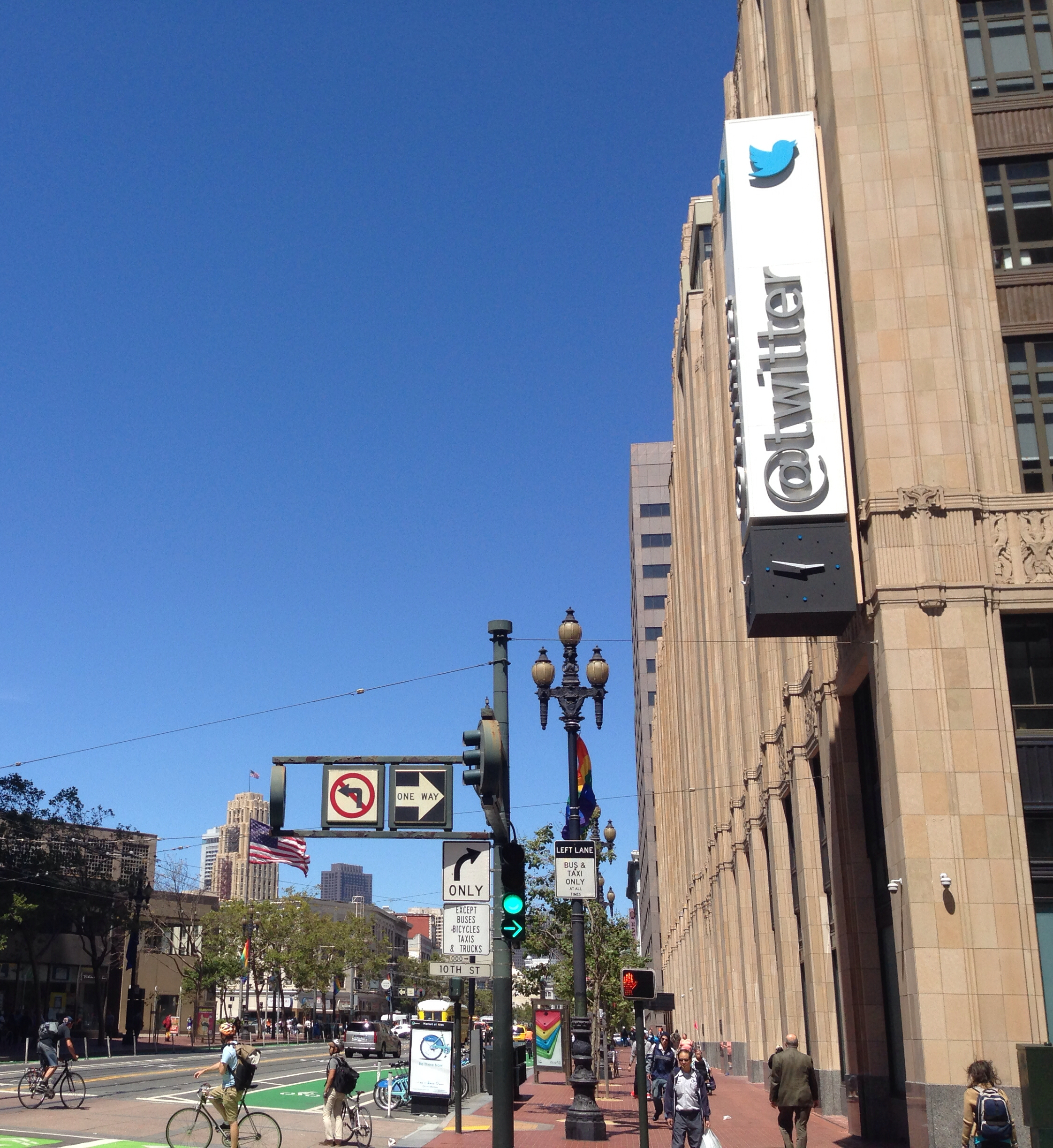
The current icon can be seen on the sign outside Twitter Headquarters in San Francisco.
“Twitter’s San Francisco Headquarters” by MatthewKeys. Licensed under CC BY 3.0 via Wikipedia
Does the Twitter bird really have a name?
Rumour has it that the Twitter bird did have a name and this is Larry. The Twitter icon now recognised across the globe, may have been named after former NBA player, Larry Bird, who played for Twitter co-founder Biz Stone’s home-state team, the Boston Celtics. Ryan Sarver a former Twitter employee shared this tweet:
The Twitter bird has become the focal point of Twitter’s branding and is for many instantly recognisable. It stands with the likes of Apple and Nike who also have no text in their logo. Today the Twitter brand policy guidelines are fastidious about the way the Twitter name and logo should be used.
Do:
• Use our official, unmodified Twitter bird to represent our brand.
• Make sure the bird faces right.
• Allow for at least 150% buffer space around the bird.
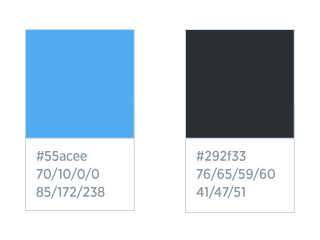
There are also guidelines on the colour palettes. The font used is primarily the Gotham Narrow family.
Don’t:
• Use speech bubbles or words around the bird.
• Rotate or change the direction of the bird.
• Animate the bird.
• Duplicate the bird.
• Change the colour of the bird.
• Use any other marks or logos to represent our brand.
Celebrating 200 million active users
In 2013 Twitter created a video caled ‘Celebrating #Twitter7’ for Twitter’s 7th birthday. This provides a nice visual history of key developments and ways Twitter has been used.
Since @jack first tweeted in 2006, Twitter has become a global town square. Thanks to all of you, our open, real-time platform is thriving: well over 200 million active users send more than 400 million Tweets every day. Here’s to your creativity, curiosity and experimentation on our platform. We’re gratified that so many millions of you have made Twitter yours. Thank you.
Twitter at 10 2006-2016
Over the last 10 years Twitter has definitely taken flight and is now used across the globe. Again Twitter capture key moments and these demonstrate the diverse ways the communication tool has been used.
Starting in 🇦🇺 on 3/21 and moving across the 🌍, we thank you for 10 incredible years.
I’ve been a member of LinkedIn since early 2008 and until last week have never had the need to dis-connect with anyone. The connection request in question was one that I received from an individual whose profile stated that he was the Head of Marketing at a large well known organisation. I teach digital marketing and frequently share information about social media, so this request did not raise any warning bells. Whilst I did not know the person, my initial skim of his profile and the usual header and summary section, provided sufficient information for me to make the decision to accept the invite to connect. It was only later that day when I received an email through LinkedIn from this person, that I thought something was not quite right… Continue reading →
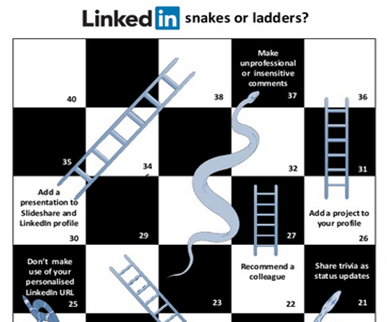
I created this ‘snakes or ladders?’ visual as a focus for an activity to use with students to get them to consider some of the key steps that can be taken to enhance a LinkedIn profile, and at the same time consider aspects that could be less valuable or indeed negative.
The full visual can be found below along with useful links to resources on LinkedIn help that provide guidance to implement the enhancement points I have picked out. Continue reading →
Whilst doing research in preparation for a keynote presentation at the University of Cambridge on the theme of ‘making connections’ I happened upon a series of tweets from Howard Rheingold. Howard has played a significant part in my digital learning journey. I have had the privilege of taking part in online courses he has facilitated, read his books and articles, as well as enjoyed many opportunities to listen in to live and recorded webinars and presentations. These experiences have lighted the curious within me and given me the confidence to explore, experiment, play, reflect and share what I have learned and encourage others to do so too.
Over the last seven years or so I have discovered how to use social media to connect with other educators and over time developed networks that have enabled and empowered my own approach to engaging with informal learning. These networks often lead on to new learning communities and collaborative projects. Some are time limited and others continue. Geographical boundaries cease to exist as we can make connections online across the world. Communication may be in real time or as and when we can pick up the messages and respond.
Learning how to use social media effectively as an educator is one of those light bulb moments. You realise the potential but then discover there is a whole load of stuff you have yet to learn to catch up with those who have already been doing it for some time. Building a personal learning network is the most important thing you can do to help you on this journey. Yes it is a journey and it does take time, but you will gain so much from this investment. The network you build will provide you with the signposts to valuable information; a pool of educators you can communicate with and ask questions of; and a rich collection of spaces you can explore to take the conversations you are interested in to new levels.
I’d like to share Howard’s eight recommendations for developing a personal learning network. Each one resonates with me and whilst the tools may change the concepts hold strong.
Explore
Search
Follow
Tune
Feed
Engage
Inquire
Respond
Here are my thoughts on each which focus on the use of Twitter as a space for developing a personal learning network (PLN). That’s not to say this is the only space to do this as there are other online social network spaces and any of these have the potential to add to the networks we build face to face.
Explore – as you begin to follow like-minded educators, take a look at who they are following. Check out the individual’s bio – what does it tell you? What are they tweeting about.
Search –take note of shared hashtags and put this in the search bar. These could indicate tweets shared at a conference e.g. #HEASTEM16, or a weekly tweetchat e.g. #LTHEchat, #HEAchat, EDENchat.
Follow – as you increase the number of people you follow, organise them into lists. This can help you to zoom into conversations from specific groups of people.
Tune – it is ok to unfollow people who don’t bring value to your feed. People use Twitter in different ways. If these conversations are not interesting or useful, then simply stop listening to them.
Feed – share information that you happen upon that you feel will resonate with those that follow you. It is quick and easy to click the share button when reading or listening to something interesting.
Engage – interact with others by responding to their tweets. Whilst brevity is key, many a useful conversation can take place.
Inquire – reach out to others and ask questions. Know when it is good to take exchanges to direct message and perhaps on to an email or phone call.
Respond – don’t simply broadcast. Listen for responses and in turn respond to these. The conversation is richer if it is two-way and we listen and answer questions raised.
Below are the tweets Howard shared in 2011. I hope you find them as useful as I do.
Thinking through steps of personal learning network building. #pln
1. Explore — it’s not just about knowing how to find experts, co-learners, but about exploration as invitation to serendipitous encounter. — Howard Rheingold (@hrheingold) January 2, 2011
2. Search – Use Diigo, delicious, listorious, to find pools of expertise in the fields that interest you. #pln
3. Follow candidates through RSS, Twitter. Ask yourself over days, weeks, whether each candidate merits continued attention #pln — Howard Rheingold (@hrheingold) January 2, 2011
4. Always keep tuning your network, dropping people who don’t gain sufficiently high interest; adding new candidates #pln
If you have not had the opportunity or want to re-look at Howard’s work, I highly recommend the following as starting points. Howard is a very generous open practitioner and someone we can all learn from as lifelong and lifewide learners.
Below is a blog post written by Prof Simon Lancaster and myself in preparation for the Higher Education Academy STEM Conference. I am sharing it here as many of the points raised are of value to anyone attending a conference. Added to this are some tips on Twitter etiquette,
The academic conference format has endured largely unchanged for decades. Despite the affordances of the internet, the opportunity to physically meet colleagues remains highly prized.
The format of the conference and the role of the lecture within that form have been hotly debated both on Twitter and between popular bloggers in the STEM community1. In practice the majority of conference presentations adopt a rather traditional style with all that entails. If the speaker has raced through quickly enough and / or is firmly steered by the chair then there will be time for questions. And of course we all know what the potential pitfalls of the conference question session are2. Whether it is a “good question” or a self-indulgent rant, it is still only one person’s question, the format will never permit everyone a voice. The conference, at least the formal sessions, might then be described as a linear experience.
Nowadays we all want to be heard, and we struggle to justify attending a conference unless presenting at least one paper. Conference organisers know this and so we have a proliferation of parallel sessions. Interesting choice of the word ‘parallel’, implying that the linear threads are never intended to cross; the result is a two-dimensional plane on which all we can do is touch the surface. Choices between sessions have to be made and the grass is always greener on the other side.
Our final observation is that the traditional conference is ephemeral and exclusive. You had to have been there. The networks you form might endure but will the handwritten notes you scribbled on the freebie notepad?
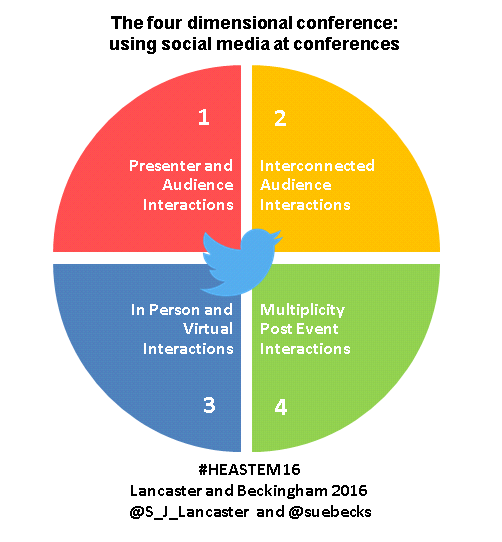
Given the authors, many of you will have guessed this blog post was always destined to arrive at Twitter. Sue @suebecks has written extensively on the value of social media to academics3 while Simon @S_J_Lancaster can tell you exactly what he thought of every lecture he attended at the 2013 HEA STEM conference4. Twitter can add additional dimensions to the conference experience:
1. Presenter and audience interactions
Twitter can render any presentation a communal event where the presenter encourages participants to tweet answers, comments, corrections and to engage in discussion. The participants themselves are able to use Twitter to crowd-source a rich and lasting record of the session.
2. Interconnected audience interactions
Twitter can thoroughly intertwine the threads of parallel sessions creating interconnected collections of stories across the conference. Analogous information between different sessions can be picked up and synergies formed to take the discussions forward online and arrange face to face meetings. Imagine a set of threads constantly colliding in a ball of twine.
3. In person and virtual interactions
The use of an event hashtag means that Twitter can facilitate the participation of people who could not attend the physical venue. By following the aggregated tweets, anyone can respond, raise questions, and provide links to associated information. Even the passive observer has an opportunity to develop their network by following interesting contributors to the conference Twitter stream.
4. Multiplicity of pre and post event interactions
The conference does not need to end after the closing remarks. Twitter can keep the discussion going and through tools like Storify keep it accessible and alive for years to come. Presenters can tweet links to their presentations uploaded to Slideshare and indeed openly share via other social networks. Participants may choose to blog about the event and embed key Tweets to emphasise points made. Within this space readers can be encouraged to interact with the blog post by ending with a question or call for feedback/opinion using the comments.
Twitter can deliver interconnectedness and timelessness to the traditional conference experience. What would you rather experience a two- or a four-dimensional conference? You know how to prepare for #HEASTEM16.
Good Twitter Etiquette
Whilst at many events it now an accepted form of communication there are a few things to consider:
When taking photos of people speaking, do seek their permission. The conference organisers may have already sought permission from speakers, but it is courteous to check.
When tweeting quotes, ensure that these are always attributed to the speaker. Ideally use the person’s Twit this is not known search for it (using the search box in Twitter or check the tweets of others who may know it. Failing that use the person’s full name. Place quotes in speech marks.
Differentiate your own opinions from the speakers.
When discussing the event through tweeting, always be polite and respectful.
If someone asks for their work not be shared, then respect that request.
Be professional and remember anyone can view the tweets.
If you are presenting, include your Twitter name at the start of your slides to make it easier for people attending your session to attribute you.
Do remember to PUT YOUR PHONE ON SILENT! No-one wants to hear the pings you may receive every 30 seconds.
Final Tips
Make new connections ahead of an event
Reach out and interact
Make a note of user names or create a Twitter list of names of people you know are attending or speaking at an event.
LinkedIn operates the world’s largest professional network on the Internet with more than 400 million members in over 200 countries and territories.
Professionals are signing up to join LinkedIn at a rate of more than two new members per second.
There are over 39 million students and recent college graduates on LinkedIn. They are LinkedIn’s fastest-growing demographic.
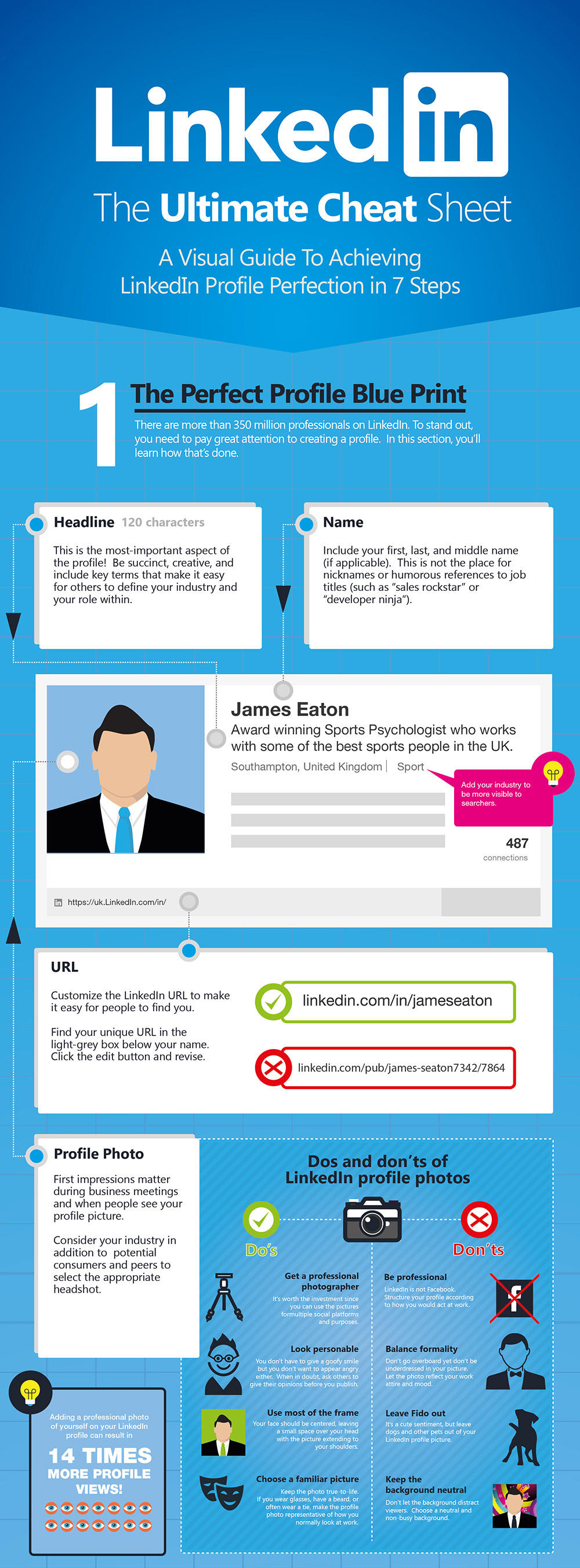
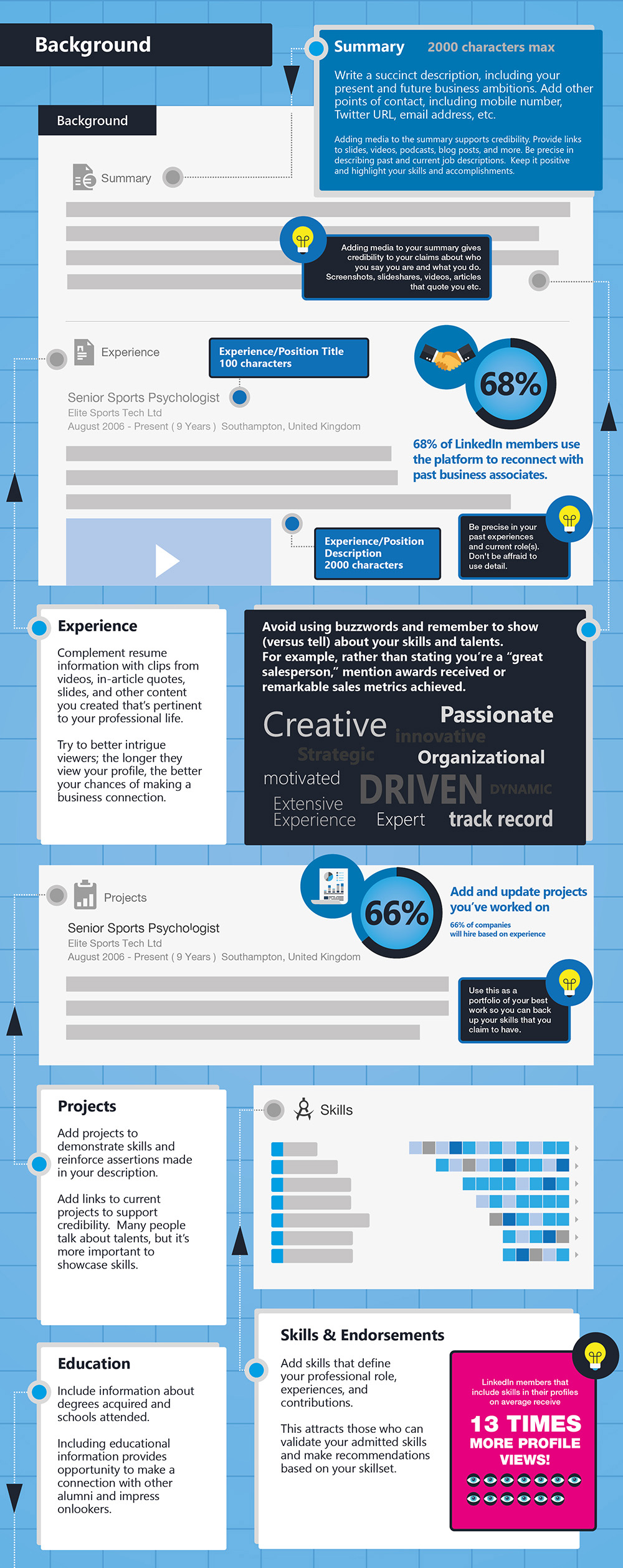
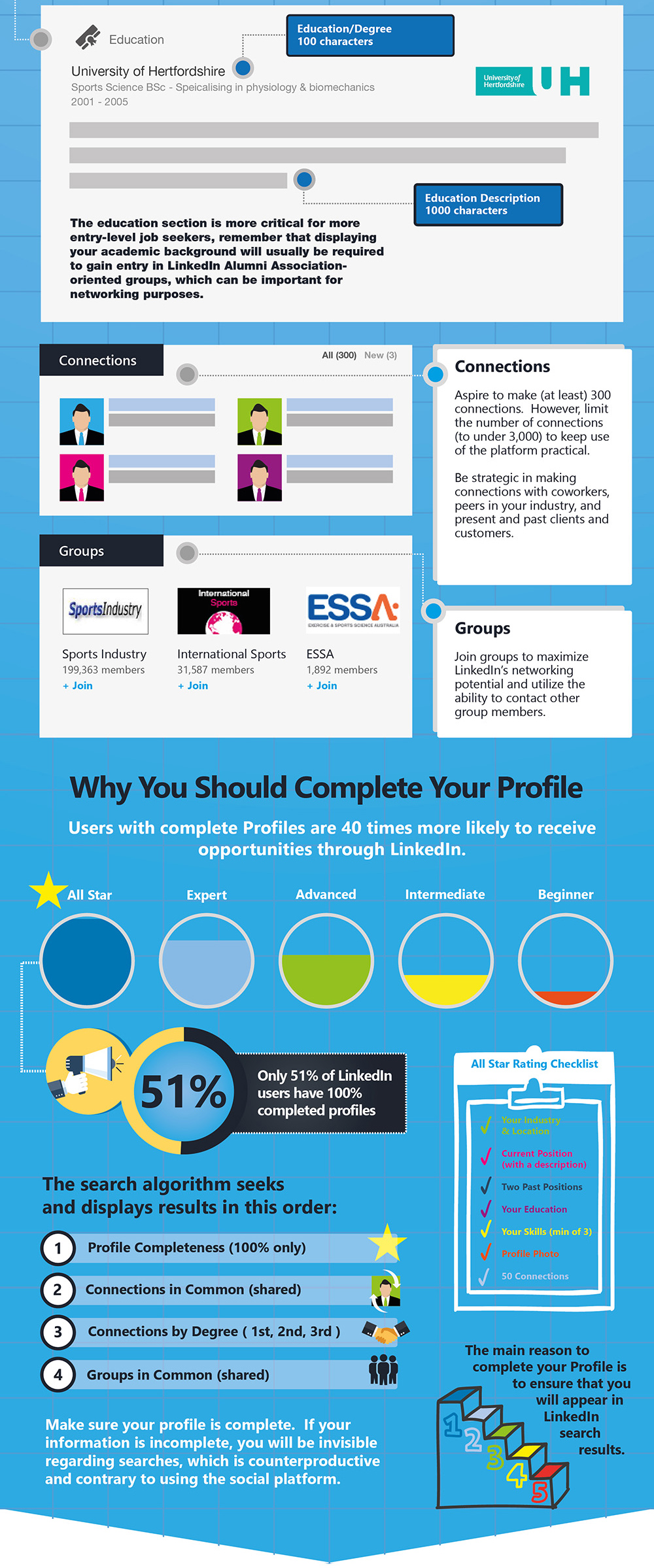
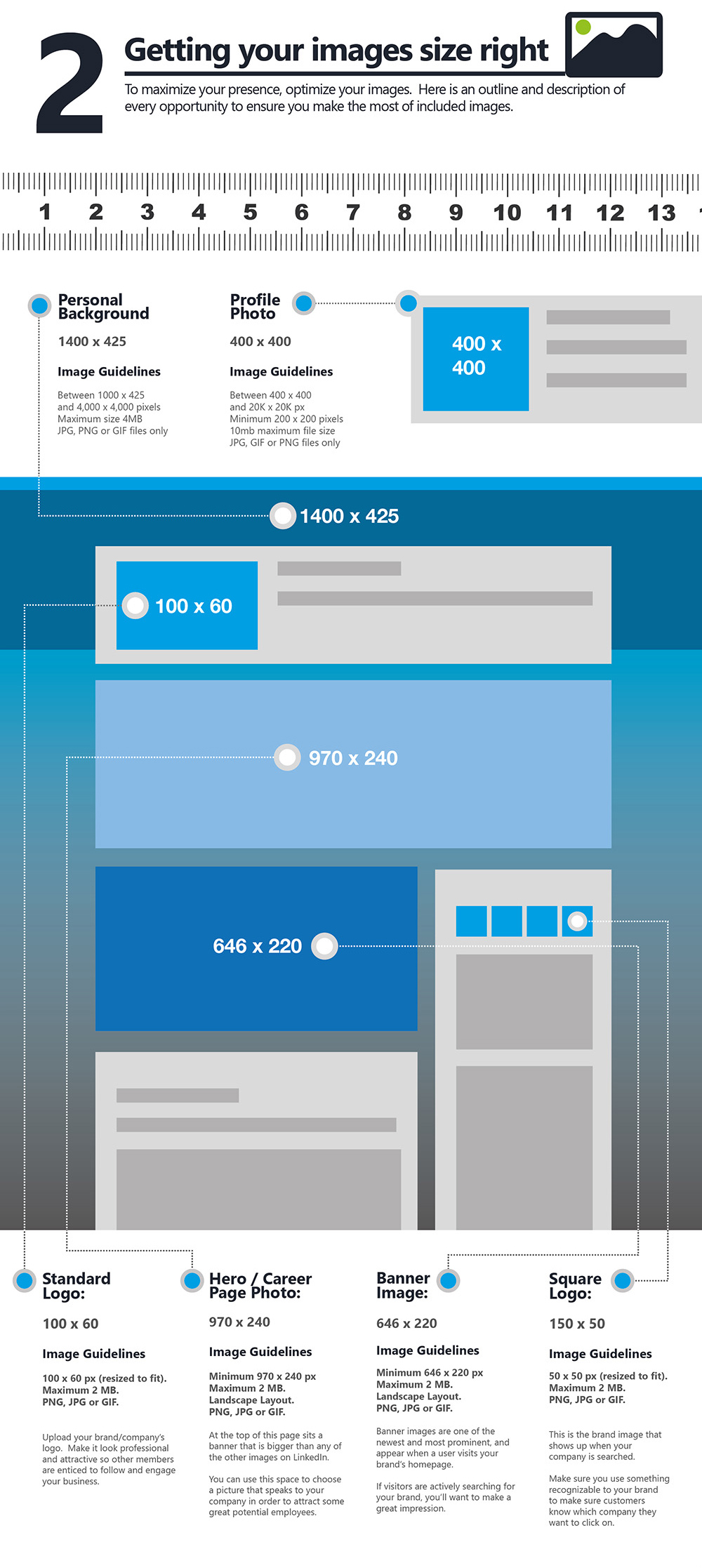
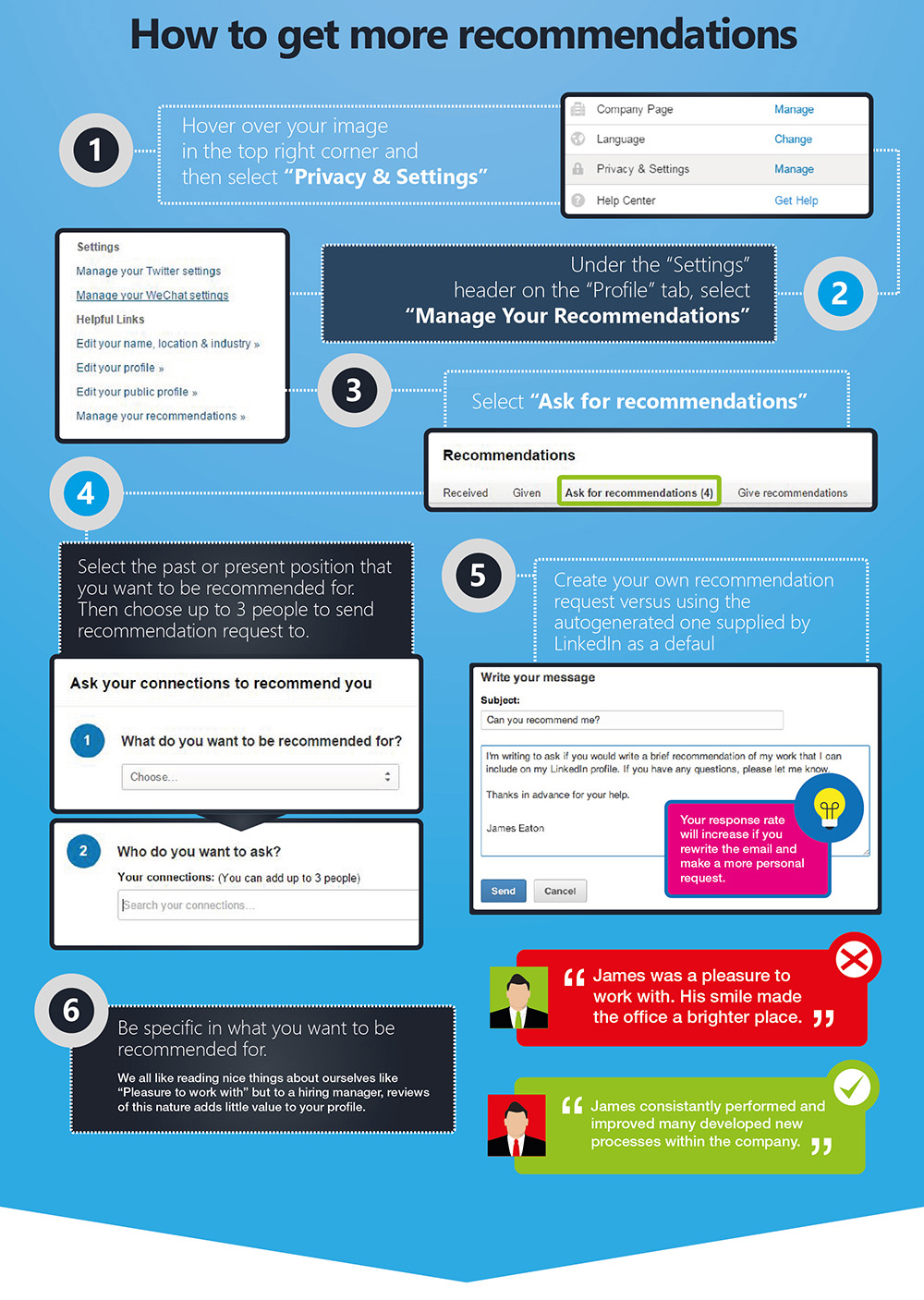
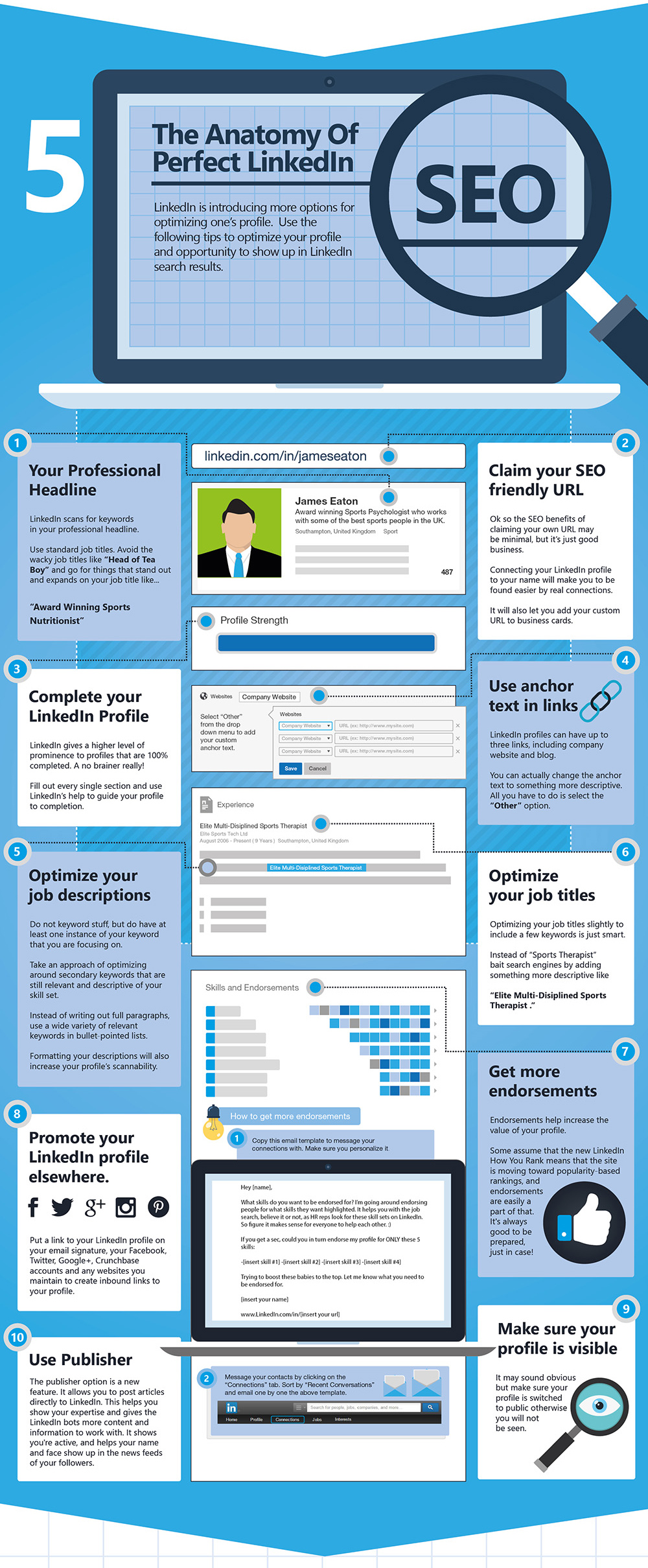
The ultimate LinkedIn cheat sheet
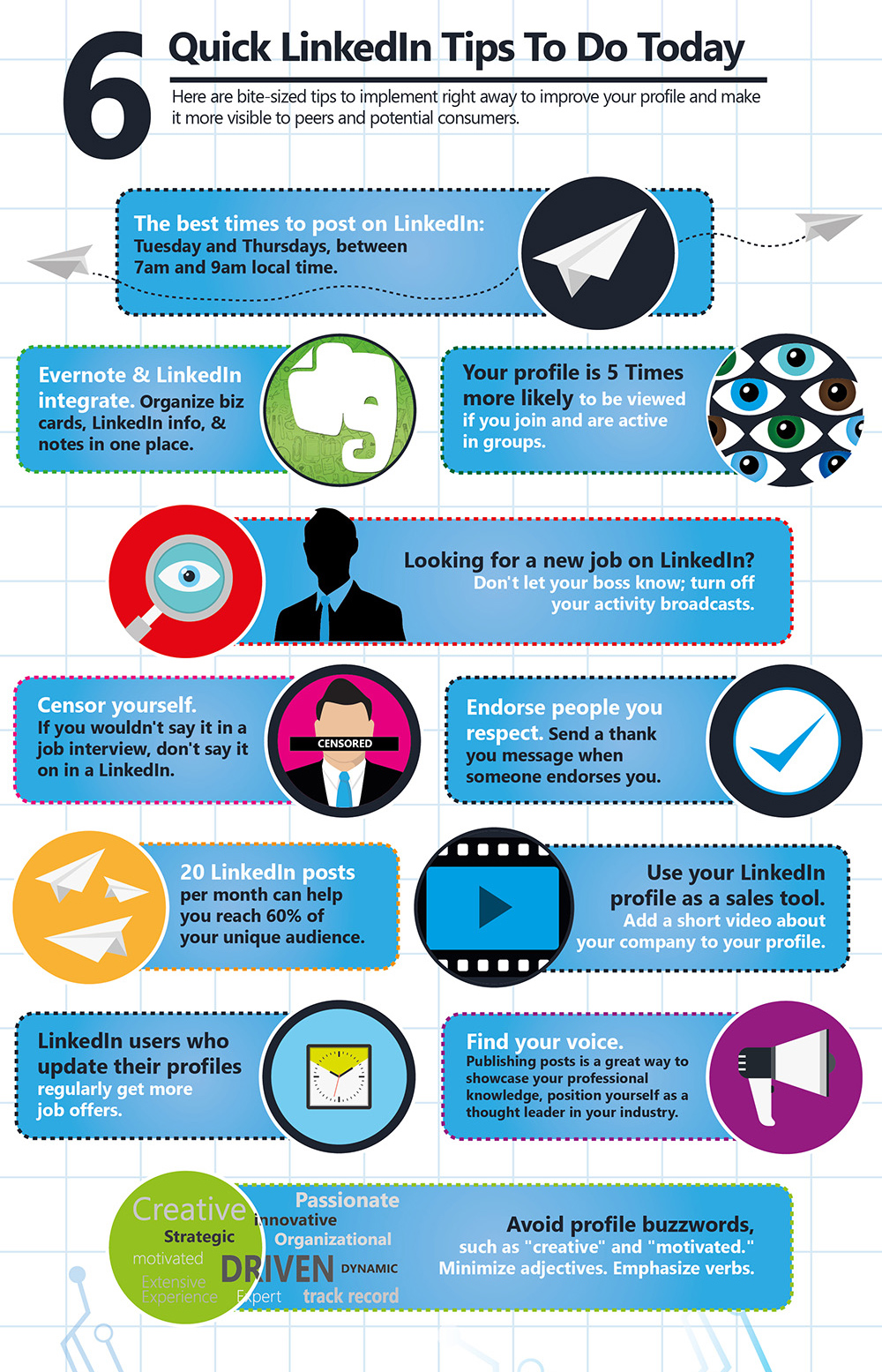
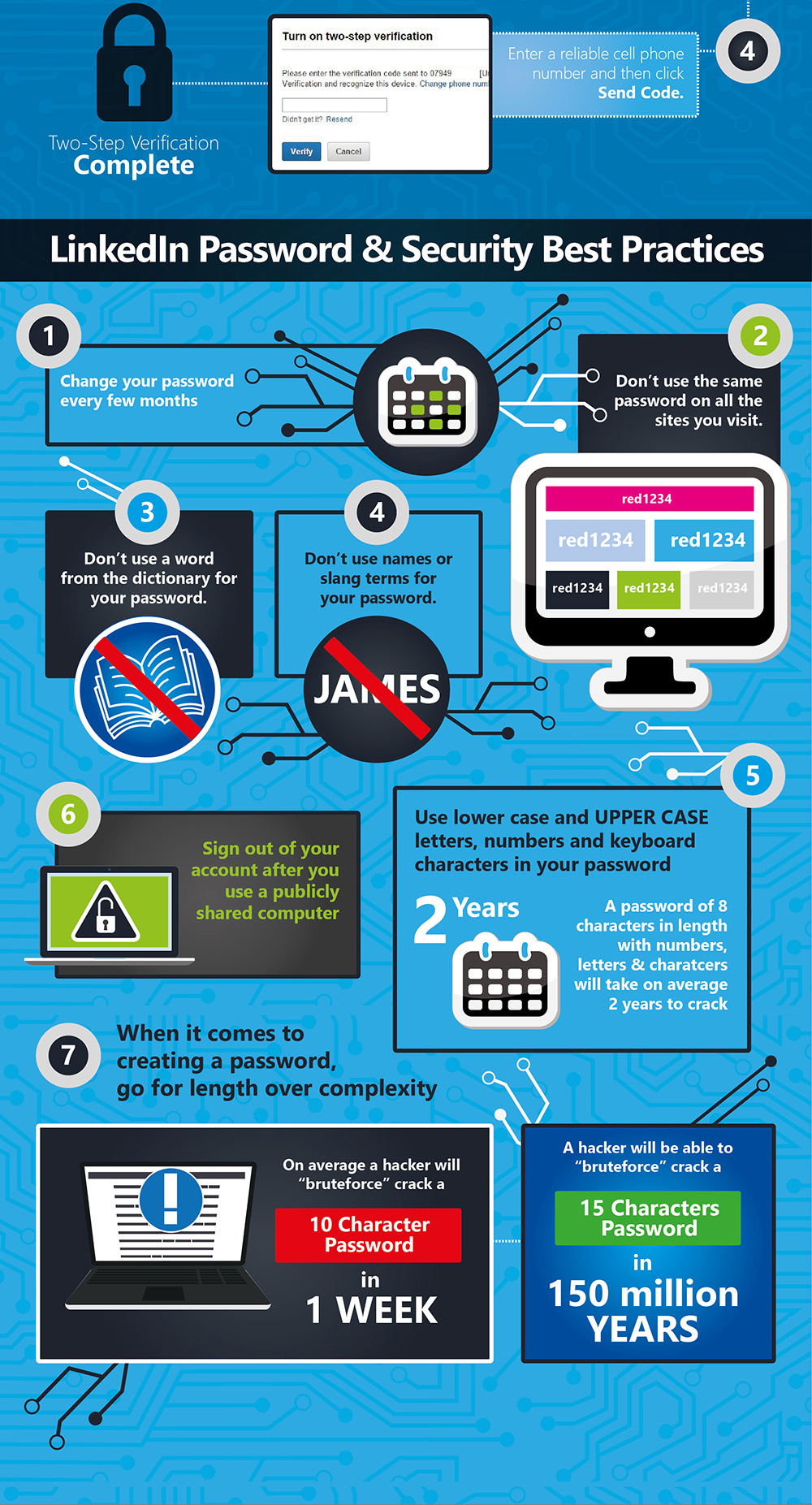
LinkedIn have grown since this super-sized infographic was created by LeisureJobs now having 400 million members. However there are a whole host of useful tips that I would recommend you work your way through. Your LinkedIn profile needs to be nurtured and updated to reflect new accomplishments or even changes in your role.
Making sure your LinkedIn profile is complete with a photograph will not only ensure you will be found in search results, but when you are found it reflects you as a professional. We know practically everyone uses Google to find information and searching for people is no different. When they see your LinkedIn profile in that search it is therefore important that what they see next on clicking this, makes a lasting and positive impression.
An additional feature that LinkedIn offers is the ability to make LinkedIn relationship notes on those you connect with, which are only visible to you. Under each connected profile you can click on ‘Relationship’ and then ‘Note’ to add information or ‘How you met’ as a reminder.
Another useful tip is to turn off your activity broadcasts if you don’t want your connections to see when you make changes to your profile, when you follow new companies or recommend connections.
Take a look at this useful visual guide to making the most of your LinkedIn profile.
Storify is a free tool that enables the user to curate information from social networks to build social stories, bringing together a variety of different media that is scattered across the Web. It provides a space to then add an additional layer by adding a narrative.
How is Storify useful?
Storify enables the user to create a multimedia digital narrative that is interactive and social
Each story can be shared as a URL link
Each element of the story can also be individually shared
It is a useful way to amplify the voices of the originators
Helps develop better web searching skills
Incorporate multimedia (video, photos, tweets, online sources) with original writing
Storify has been used extensively to curate information shared via social media for events and current affairs. For example to:
Curate tweets shared during a conference
Aggregate a timeline of events
Reactions to important stories and breaking news
Live tweeting and eye witness reports
Gather social media responses about an event
Curate the history of a given event as a timeline
Create a narrative that can help readers makes sense of an event
How can Storify be used in Learning and Teaching?
STUDENT
A research/topic based post
Create multimedia how to guides
Develop an annotated bibliography
Curate key points from a lecture by note taking using Twitter and gathering as a story
Build a digital CV
TEACHER
Create a digital hand-out of readings or videos with questions to respond to
Curate a collection of videos you want to play during a class
Raise a question on Twitter and curate the responses as a story
Hold a Q&A tweetchat and curate the dialogue
Develop a class plan
How does Storify work?
Users can search through, multiple social networks right from the one place in Storify, and then drag individual elements into stories. Each element keeps the original links and functionality. Text boxes can be added wherever you choose and it is within these that the digital narrative comes into its own. Using drag and drop both the text boxes and elements can be reordered quickly and easily.
You can search for content from Twitter, Instagram, Facebook, YouTube, Gifs, Flickr, Getty images and there’s also an option to paste in specific URLs. The ‘3 dots’ sign to the right of these options reveals more in a drop down menu.
Once users have selected their chosen photos, video, tweets etc., added the optional narrative, they can publish and share their digital narratives via social networks or by email using the URL.
The Chrome extension adds an even richer experience. You can add the Storify extension to gather not only tweets, but most Web content right at the source. https://storify.com/tools
Below is the presentation I gave with my wonderful research partners Dr Alison Purvis and Helen Rodger at the 2015 Social Media for Learning in HE Conference #SocMedHE15 at Sheffield Hallam University. We were all also key members of the organising team for the conference.
The focus of our study investigates current institutional practice of the use of social media to support and enhance learning. Our short paper shares survey findings; highlighting both enablers and barriers for what is for many, still considered innovative practice where peers are calling for guided support.
There are many examples of social media used in HE to enhance learning and teaching. While some academics are confident in exploring multiple strands of social media and blend them instinctively for a multi dimensional learning experience; others are more tentative, preferring to understand the nature of the tool or process thoroughly, often by learning from others before embarking on a social media based activity (Beckingham, Purvis and Rodger, 2014). There are a broad range of factors, experiences and perceptions that may influence an individual and their resulting use of and expectations of social media as a learning construct.
The aim of the study was to examine current institutional practice in the use of social media in this way, to inform strategic direction and consider implications for future academic development to achieve a positive impact on the learning experience for students.
Fifty individuals responded to an online survey. While the majority of these (n=33) were already using social media in some way in their teaching practice, and mostly had positive attitude to it, the remainder had not. Some were open to the idea, though naturally cautious, but others were clear that it had no place in their teaching practice.
This rich picture presented a variety of barriers and enablers: where confidence was high and support and equipment available; uptake of social media as a technology enhanced learning tool was more prevalent and more successful. There was a strong connection between support (formal and informal) and individual confidence, and a subsequent willingness to try new things to enhance learning.
Recent research advocates the development of digital capabilities including the confident use of social media for communication and collaboration (Beetham 2015); and that where embedded, provide essential skills for future graduates. It is therefore timely to review the skill sets and development needs of staff in order to support the learning of students.
The aim of this blog is to help you explore the different ways you can interact online using social media and the tools to help you do this.
Introducing Social Media
Social Media is an umbrella term for web based and mobile technology that allows the user to produce and share information with others using text and/or media (video, audio, images), who in turn are then able to engage in a interactive dialogue about the content.
About me
Sue is an Associate Professor Learning and Teaching and National Teaching Fellow at Sheffield Hallam University; a Visiting Professor at Arden University and a Visiting Fellow at Edge Hill University. She is also a Principal Fellow of the HEA, a Senior Fellow of the Staff and Educational Development Association, a Certified Management and Business Educator and a Member of the Association of Learning Technology.

















 Sue Beckingham






 Social Media for Learning