Beyond the ‘Google it’ search bar (as it’s not the only way you can search)

Google has long since been the verb for online searching. For many of us it is the only way we search for information. In 2012 alone there were 1.2 trillion searches. Many of these will have been done directly from the familiar search bar on the home page. However you can utilise more search options by clicking on the ‘More’ tab. You can also conduct an advanced search and narrow down your results by language, region, last update, reading level, file type and more.
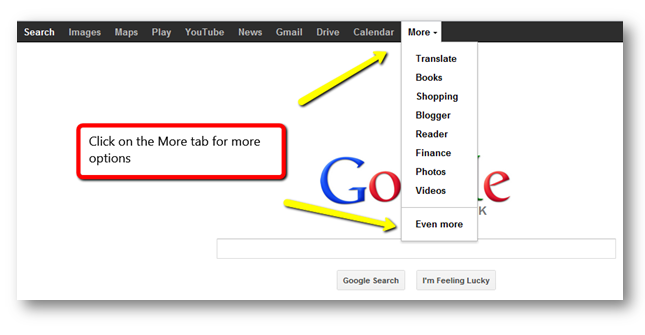
Google more tab

Continue reading

Posted in Google, LinkedIn, Tips | Tagged , , | 2 Comments

What’s an infographic you ask?

I am a very visual learner and absorber of information. I use images rather than bullet points in my presentations to recall information. Recently when I was talking about this I mentioned how much I liked infographics. This term was not known by my colleague and when I explored further others were also unfamilair with the term.

An infographic is a visual way to represent data and is usually presented in a poster format. It a nice way to present sometimes complex information in an interesting way that is easy to digest. A well known example is the London Underground map.

Tube_map_thumbnail

London Tube map 1908
The simplified version we are now very familiar with and regularly use is on the left and the 1908 map version is on the right. Continue reading

Posted in Visual Communication | Tagged | 1 Comment

The social media cheat sheet

The infographic created by Flowtown is a handy introduction to six useful social media tools. It is aimed at small businesses but I think useful to anyone wanting to learn a little more about social media. The visual layout of an infographic provides the reader with digestible bite sized pieces of information.

social media cheat sheet

Source: Flowtown

Posted in Social Media | Leave a comment

Vine: The 6 second video app

Vine logo

Vine is a new way to share video. This free app (currently only available for iPhone and iPod Touch) allows the user to record and then embed a 6 second video directly in a tweet. You can choose to record one scene by holding your finger down on the screen or several scenes by releasing the pressure and re-applying to start recording again. You could also create a mini stop motion scene movie by moving the subject you want to record slightly in the same manner the original cartoons were created. Vine also captures audio.

Once you’ve create your vine you can then choose to simply save it or share with the world! The cynics thought 140 characters would be of little value and how wrong they were. It will be interesting to see how creative people get with 6 seconds!

Below are some examples of how it Vine is being used from the fun to the more serious.

Stop Motion

Continue reading

Posted in Twitter, Visual Communication | Tagged | 3 Comments

Taking a virtual field trip around the world using Google Maps Street View

Google_Street_View

http://maps.google.com/help/maps/streetview/gallery/index.html

I follow Google in Education on Google+ and come across a variety of interesting posts. For those not familiar with Google+ take a look at the information I’ve written about this social networking site.

The post that caught my eye on Google+ and inspired this post was an entry about Virtual Field Trips using Street View technology. Google Maps with Street View lets you explore places around the world through 360-degree street-level imagery. Continue reading

Posted in Google | Tagged , , | Leave a comment

Say good-bye to file version worry: Google Drive

Google drive

Introducing the all-new Google Drive. Now access your files, even the big ones, from wherever you are. Share them with whomever you want, and edit them together in real time. Continue reading

Posted in Google | Tagged | Leave a comment

There’s more to Wikipedia than you might think!

Wikipedia logo

Wikipedia is a collaboratively edited, multilingual, free Internet encyclopedia supported by the non-profit Wikimedia Foundation. It was launched in 2001 by Jimmy Wales and Larry Sangar and now boasts over 24 million articles written in 285 different languages. Continue reading

Posted in Social Media | Tagged , | Leave a comment

Staying safe online: some useful tips to consider

What happens on the web in 30 seconds

Safety

We are all using the web more than ever before and saving information including digital photos and videos on our laptops, tablets and PCs; shopping online and sharing information via the social networks we have joined. Something we need to think about however is how safe is our data and what are we sharing? Continue reading

Posted in Safety, Tips | Tagged , , | 6 Comments

Thinking about your online social and professional identity

DPD_Infographic_Thumb

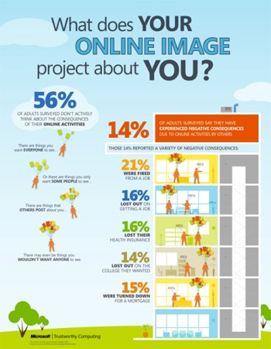
The sharing of images online through social media sites has become increasingly easy to do. Many of us can now take a photo using our mobile phone and share almost instantly via our digital social channels such as Facebook and Twitter. However what is sometimes forgotten is how easy it can be for others to re-share your images. In many cases you may be quite happy for this to happen, however there may be photos you only want to share with certain people. Being aware of the security settings on the social sites you use is very important. These tend to change periodically (Facebook being one to confuse many including Mark Zuckerberg’s own sister!). Continue reading

Posted in Facebook, Twitter | Tagged , , , | 6 Comments

Different ways to organise and bookmark your favourite weblinks

organised_postitThere are a number of different tools you can use to organise and bookmark the social media sites, websites and blogs you visit most. The likes of Diigo and Delicious enable you to save, sort, and search through your own personal collection of links. Others such as Pageflakes and Netvibes allow you to access all your social media and online apps, read all your news and blog feeds, all from one page. However one dashboard I’ve just re-discovered is Symbaloo where I’ve created my personal webmix. Continue reading

Posted in Social Media, Tips | Tagged , , , , | 4 Comments