Social Media for Learning in Higher Education Conference #SocMedHe15 – A brief snapshot (more to follow)

Blog_header

On the 18th December 2015 the inaugural Social Media for Learning in Higher Education Conference #SocMedHE15, a one day conference, with pre-conference workshops was held at Sheffield Hallam University. #SocMedHE15 is about the use of social media for learning in Higher Education and was designed to create a forum for academics, their students, developers and strategic managers to consider the opportunities, challenges and the disruptive influence of social media for learning. The conference was structured around three themes to explore the pedagogic possibilities of social media, as well as the strategic and operational challenges institutions face in supporting it.

The title of this year’s conference was:
“Finding Our Social Identity”

The conference themes encouraged delegates to investigate the disruptive nature of social media; share our practice in the use of social media for networked, social and active learning, and to consider some of the challenges of being responsive, supportive and open for change.

The conference keynote was Eric Stoller, who both challenged and inspired us to review social media in our context within higher education, and explored the opportunities of extending our networks for learning and to consider and reflect upon how we as universities need to respond to the Social Age. Eric’s keynote was fun, quirky and provocative.

Eric is a higher education thought leader, consultant, writer and speaker. His website is http://ericstoller.com. He is also the Student Affairs and Technology blogger for Inside Higher Ed.

Over 50 workshops, short papers and thunderstorm presentations were given. Presenters came from across the UK, the US, Australia, Saudi America, Canada and Mexico. You can find the speakers on Twitter here:
https://twitter.com/SocMedHE/lists/socmedhe15-speakers


Virtually Connecting

Maha Bali organised and led a Virtually Connecting Google hangout where virtual participants of the conference could ask questions about Eric’s keynote and other aspects of his work.

LiveBlogs and Sketchnotes

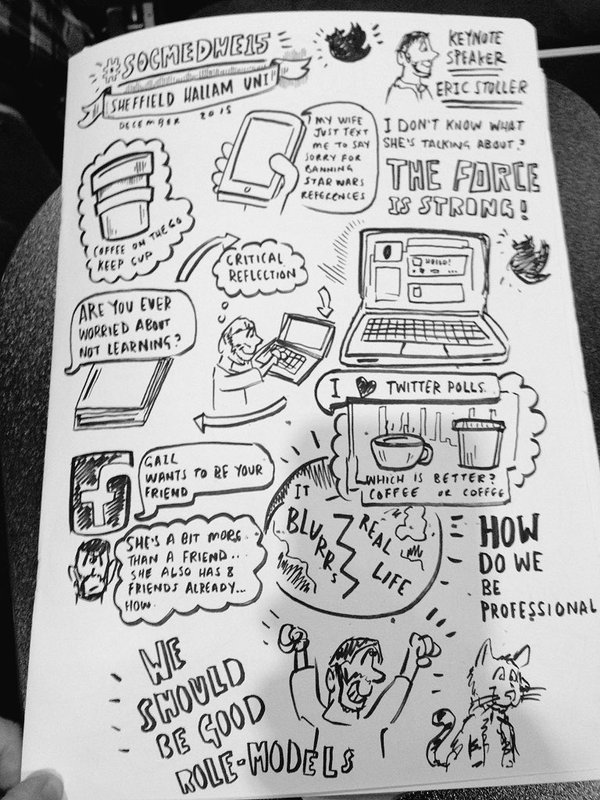
Nicola Osborne a presenter at the conference live blogged all of the sessions she attended including the keynote. Sarah Smith, a student at Sheffield Hallam made sketch notes of the sessions she intended. Below are those of the keynote.
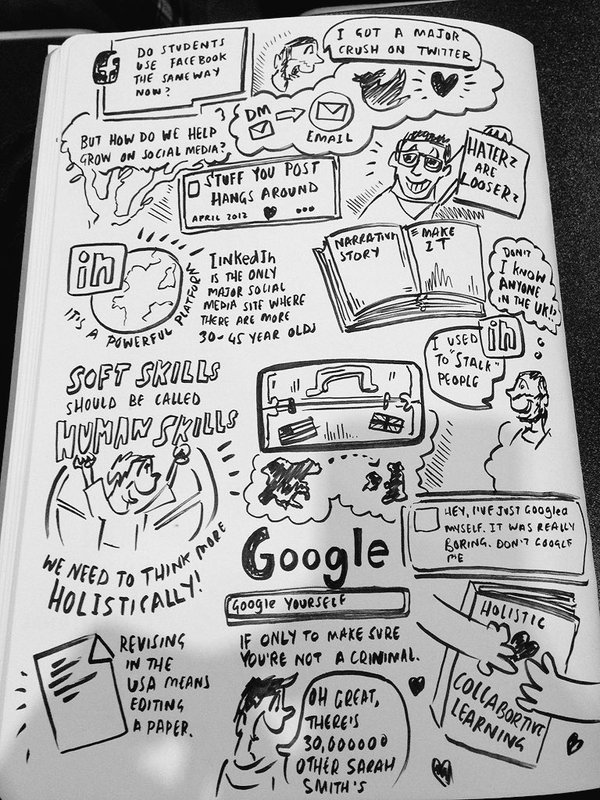
sketchnote Eric Stoller sketch note 2

NodeXL: Network Overview, Discovery and Exploration for Excel

A huge thanks goes to Marc Smith Director of the Social Media Research Foundation in California, who created the amazing NodeXL visualisations below of the Tweets containing the conference hashtag #SocMedHE15.

The graph represents a network of 930 Twitter users whose recent tweets contained “#SocMedHE15”, or who were replied to or mentioned in those tweets, taken from a data set limited to a maximum of 18,000 tweets. The network was obtained from Twitter on Sunday, 20 December 2015 at 23:29 UTC.

The tweets in the network were tweeted over the 9-day, 6-hour, 23-minute period from Friday, 11 December 2015 at 16:04 UTC to Sunday, 20 December 2015 at 22:27 UTC. There is an edge for each “replies-to” relationship in a tweet, an edge for each “mentions” relationship in a tweet, and a self-loop edge for each tweet that is not a “replies-to” or “mentions”.
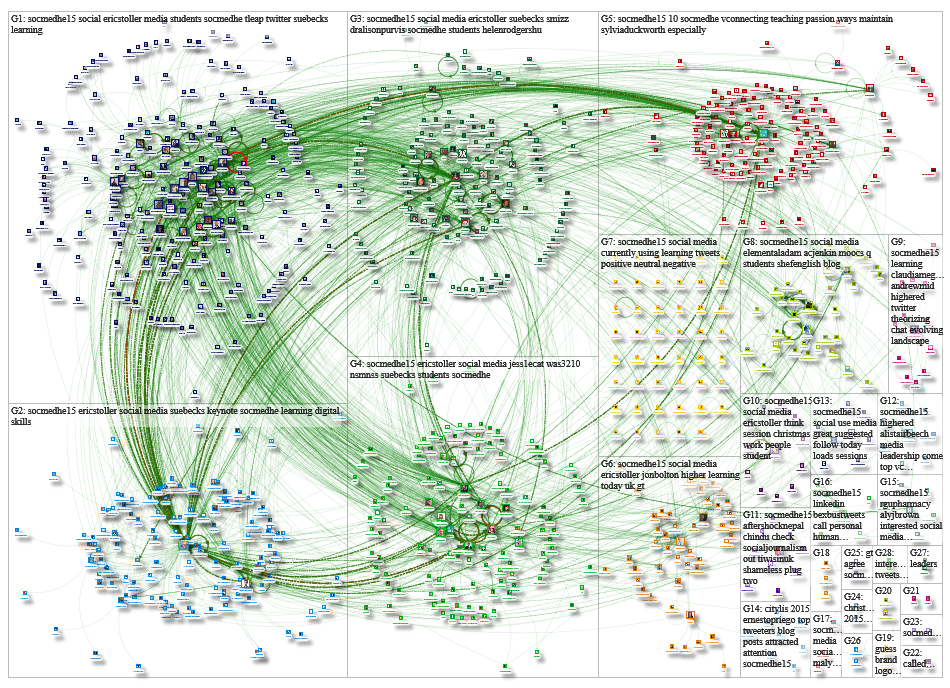
NodeXL map

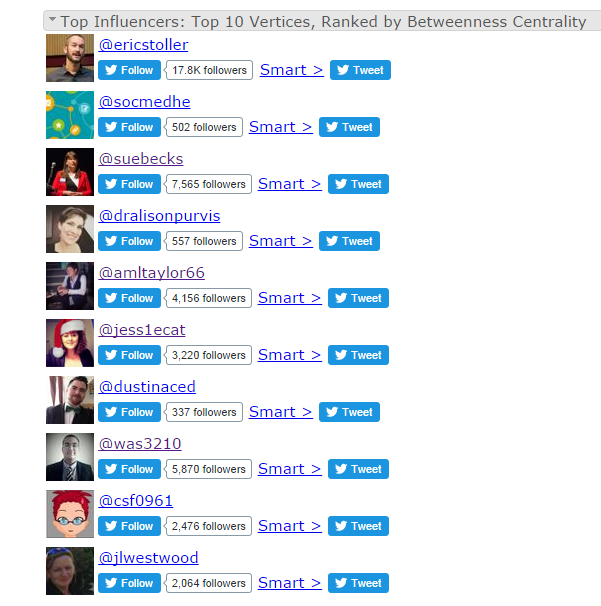
Top influencers

You can view the entire NodeXL report here, however below are some key examples of the data gathered

Top Mentioned in Entire Graph:
ericstoller
socmedhe
suebecks
dralisonpurvis
jess1ecat
helenrodgershu
sheffhallamuni
was3210
smizz
andrewmid

Top Hashtags in Tweet in Entire Graph:
[4399] socmedhe15
[229] tleap
[80] studentpick
[77] nsmnss
[70] socialmedia
[59] starwars
[54] highered
[41] lthechat
[37] learningwheel
[33] nodexl

Top URLs in Tweet in Entire Graph:
[50] https://blogs.shu.ac.uk/socmedhe/842-2/
[37] https://speakerdeck.com/ericstoller/social-media-for-teaching-learning-and-literacy
[34] http://nicolaosborne.blogs.edina.ac.uk/2015/12/18/social-media-for-learning-in-higher-education-2015-socmedhe15-conference-liveblog/
[31] http://virtuallyconnecting.org/announcements/we-are-vconnecting-w-ericstoller-suebecks-from-socmedhe15/
[29] https://www.insidehighered.com/blogs/student-affairs-and-technology/trusting-your-digital-champions
[22] http://www.ucisa.ac.uk/socialmedia
[22] https://blogs.shu.ac.uk/socmedhe/heart-and-mind-student-facebook-groups-emphasise-that-learning-is-emotional-as-well-as-cerebral/
[22] https://blogs.shu.ac.uk/socmedhe/morality-social-media-and-the-educational-researcher/
[15] https://blogs.shu.ac.uk/socmedhe/
[15] http://ericstoller.com/blog/2015/11/30/social-media-for-learning-in-higher-education-conference-socmedhe15/


This is just a snapshot of the #SocMedHE15 conference. I will be writing a further post on other aspects of what was an incredible conference! 

Posted in Event, Social Media | Tagged | 1 Comment

Using YouTube in Learning and Teaching

YouTube strip

With over a billion users across the globe YouTube has become the go to place for finding, watching and sharing videos. YouTube was founded in 2005, and sold a year later to Google for $1.65 billion. The infographic below captures the incredible growth of YouTube. It is hard to believe it is only 10 years old.

300 hours of video are uploaded to YouTube every minute. Contrary to some people’s belief YouTube videos are not just about cats! There of course fun videos a plenty, however there are also many educational uses of video. The prolific growth of smart phones has meant that anyone can create a video and upload to YouTube with just a few ‘clicks’. The videos can be shared via social networks and embedded into blogs, websites and virtual learning environments.

You can also edit and customise videos using the YouTube Video Editor.


With the Video Editor, you can:

  • Combine multiple videos and images that you’ve uploaded to create a new video
  • Trim your uploads to custom lengths
  • Add music to your video from a library of approved tracks
  • Customise clips with special tools and effects

You can get to the Editor at http://www.youtube.com/editor.

Using these tools, you can put together clips to create new videos and publish them to YouTube with one click.


10 Ways to use YouTube in your Teaching

  1. Ask your students to create ‘About Me’ videos and share with the class
  2. Create a playlist of videos you are going to use in lessons
  3. Encourage your students to subscribe to relevant subject related channels or playlists
  4. Showcase student work by creating a course channel
  5. Use TED talk videos (or other relevant videos) as a focus for discussion
  6. In place of a face to face presentation ask students to screencast* their presentation with a voice over
  7. Create how to guides to introduce new concepts
  8. Produce video summaries of assessment briefs and the marking criteria
  9. Use video to give students feedback (this could be a screencast with voice over)
  10. Ask students to reflect on this feedback as a video and embed in their digital portfolio

*A useful screencast tool is Screencast-o-matic and allows you to capture whatever is on your screen with audio. This can then be uploaded to YouTube (as well as other spaces).


YouTube channels for Educators

Here are a selection of educational channels:


Some interesting YouTube statistics 

  • YouTube has over a billion users – almost a third of all people on the Internet – and every day, people watch hundreds of millions of hours of YouTube videos and generate billions of views.
  • YouTube overall, and even YouTube on mobile alone, reaches more 18-34 and 18-49 year-olds than any cable network in the U.S.
  • The number of hours people spend watching videos (aka watch time) on YouTube has increased by 60% y/y, the fastest growth seen in 2 years.
  • The number of people watching YouTube each day has increased by 40% y/y since March 2014.
  • The number of users coming to YouTube who start at the YouTube homepage, similar to the way they might turn on their TV, has increased by more than 3x y/y.
  • 80% of YouTube’s views are from outside of the U.S.
  • YouTube has launched local versions in more than 70 countries.
  • You can navigate YouTube in a total of 76 different languages (covering 95% of the Internet population).
  • On mobile, the average viewing session is now more than 40 minutes, that’s an increase of more than 50% y/y.
  • The number of hours people spent watching videos on mobile has increased by 100% y/y.
  • More than half of YouTube views come from mobile devices.

(via YouTube)


YouTube – The 2nd Largest Search Engine (Infographic)

Created by Mushroom Networks

Header image: Pixabay (public domain licence)

Posted in Visual Communication | Tagged | 3 Comments

Curious about the Internet of Things? Read on – a short intro. #IoT

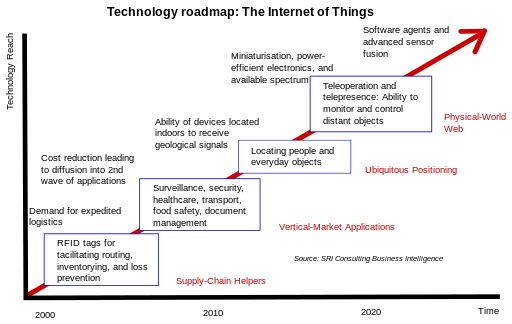
"Internet of Things" by SRI Consulting Business Intelligence/National Intelligence Council - Apendix F of Disruptive Technologies Global Trends 2025 page 1 Figure 15 (Background: The Internet of Things). Licensed under Public Domain via Commons - https://commons.wikimedia.org/wiki/File:Internet_of_Things.svg#/media/File:Internet_of_Things.svg

“Internet of Things” by SRI Consulting Business Intelligence/National Intelligence Council – Apendix F of Disruptive Technologies Global Trends 2025 page 1 Figure 15 (Background: The Internet of Things). Licensed under Public Domain via Commons – https://commons.wikimedia.org/wiki/File:Internet_of_Things.svg#/media/File:Internet_of_Things.svg

The Internet of Things (IoT) is the network of physical objects or “things” embedded with electronics, software, sensors, and network connectivity, which enables these objects to collect and exchange data. (Wikipedia). The IoT will provide constant contact with our clothing and wearables, cars, offices and our homes. Each item providing information and capable of both sending and receiving information, and then reacting to what it finds.

Thinking about a typical day. Your alarm clock could trigger the coffee machine. Your car could could be connected to your diary and auto sync to a map to provide you with the best direction taking in account weather conditions,  traffic congestion or diversions. Running late? No worries an auto-text will inform whoever you are due to meet. Smart parking will direct you to available spaces. Vehicle auto-diagnosis will remind you when you need fuel, air in your tyres or an MOT. In the office your printer will know it is running low on toner and auto-reorder new supplies. Smart lighting and heating will auto-adjust, helping to reduce energy use. Your chair and monitor heights will auto-adjust wherever you are working. As the evening draws in the curtains in your home will draw close, a welcome light will come on and your smart crock pot will have your evening meal in control.

Harbor Research who curated the infographic below say that from their perspective, this story is not just about people communicating with people or machines communicating with machines. Smart, connected systems are a technological and economic phenomenon of unprecedented scale, encompassing potentially billions if not trillions of nodes — an Internet of infinite interactions and values…

Smart Systems and the Internet of Things are a combination of:

  1. Sensors – location data using GPS sensors. Eyes and ears using camera and microphones, along with seonsory organs that can measure any thing from temperature to pressure changes. For example:
    • position/presence/proximity, motion/velocity/displacement, temperature, humidity/moisture, acoustic/sound/vibration, chemical/gas, flow, force/load/torque/strain/pressure, leaks/levels, electric/magnetic, acceleration/tilt, machine vision/optical ambient light
  2. Connectivity – these inputs are digitised and placed onto networks
  3. People and Processes – these networked inputs can then be combined into bi-directional systems that integrate data, people, processes and systems for better decision making

The interactions between these entities are creating new types of smart applications and services. Examples given include smart thermostats, connected cars, activity trackers, smart outlets and parking sensors.

“We are giving our world a digital nervous system.”

The diversity of applications will affect:

  • Home and consumer  e.g. light bulbs, security, pet feeding, irrigation controller, smoke alarm, energy monitoring
  • Transport and mobility e.g traffic routing, package monitoring, smart parking, shipping
  • Health and body  e.g. patient care, elderly monitoring, remote diagnostic, equipment monitoring, hospital hygiene, bio wearables, food sensors
  • Buildings and infrastructure – e.g. security, lighting, electrical, transit, emergency alerts
  • Cities and industry – e.g. electrical distribution, maintenance, surveillance, signage, emergency services, waste management

Connectivity may take three forms: one-to-one, one-to-many or many-to-many. The combinations are limitless.


What Exactly Is The Internet of Things? #infographic

Source: http://www.visualistan.com/2015/09/what-exactly-is-internet-of-things.html

You can also find more infographics at Visualistan

Posted in Technology | Tagged | Leave a comment

Who are you and why should I follow you back on Twitter?

faceless woman

Public domain image: Pixabay

Who are you?

Choosing who to follow 

My positive engagement with Twitter has a direct correlation with those I am following. I have always said Twitter is only as good as the people you choose to follow. Muireann O’Keeffe reminded to also add – and the information they choose to share. Twitter as a space has opened up new pathways for informal learning as users share nuggets of information embellished with links, images and videos. My choice of who to follow is a personal choice and is based on my professional interests. My interests may align with yours, however may at best only partially do so. Only you can decide who is interesting to follow.

Given the focus of my blog I am clearly interested in social media for learning. As an educator I am also concerned about how social media is being used, the impact of our digital footprints and digital identity.  I teach Digital Marketing so have an interest in how social media is being used by brands and organisations. My research of social media takes me in many different directions. The use of technology to enhance learning is also of interest, as is the social impact of cloud computing and the internet of things. The combination of all these interests means that I have a wide variety of connections – aka those I follow.

When making the judgement to follow someone new, I will consider the bio, the profile image, and then skim through recent tweets to see what is being shared.  To some extent I then have to follow my instincts. I’ll be honest and tell you that there are occasions I’ve found that an individual I’ve followed has not lived up to expectations – that is to say their tweets don’t relate to my interests. At this point I can choose to unfollow.

Sometimes I miss new followers that I do have shared interests with. I find this out when an interaction takes place – it could be something they have tweeted or I have. At this point I will make the connection. My advice here is that if you want to connect with someone, step one is following but step two should be to follow up with a tweet to introduce yourself and say what your shared interests are. This is where the social comes to the fore and the realisation of dialogue over monologue.


Concerns

Unfortunately not all those who follow you are genuine. There are sadly an alarming proportion of fake accounts on Twitter. Fake user accounts can be a source of spam and malicious links. If you are concerned you can block a user that has followed you and they will no longer be able to see your tweets. You can find out how to block an account here.

Another issue is where an individual, organisation or brand is impersonated. Impersonation is a violation of the Twitter’s rules. In the event you identify a fake account, or an account impersonating you or your organisation, then do report this to Twitter here:
https://support.twitter.com/forms/impersonation.


Avoiding fake accounts

There are some key areas to focus on:

  • The profile bio: Is it informative and does it describe the personality or profession of the person or organisation?
  • The profile photo or avatar: Does the image relate to the bio. It is wise to steer clear of the bikini clad girls like the plague.
  • The conversations: Do the shared updates match the tone and context of a genuine account? If in doubt never click on a link.
  • The followers and who the account is following: A fake account is likely to have a disproportionate follower and following count.


Verified accounts

Twitter provides a verification process for high profile accounts and explains this as follows:

What is a verified account?
Any account with a blue verified badge on their Twitter profile is a verified account.

Why does Twitter verify accounts?
Verification is currently used to establish authenticity of identities of key individuals and brands on Twitter.

What kinds of accounts get verified?
Twitter verifies accounts on an ongoing basis to make it easier for users to find who they’re looking for. We concentrate on highly sought users in music, acting, fashion, government, politics, religion, journalism, media, sports, business and other key interest areas.

Twitter does not accept requests for verification from the general public.


Mistaken identity

There are many cases where genuine user names have been mistakenly used in tweets relating to brands and celebrities. Think carefully about the user name you choose!


Developing your own profile

It is important to consider how others perceive your profile. It is therefore in your interests to add relevant information to help potential followers make the decision to follow. Two key areas are your profile image and profile bio.

Twitter egg icon

When you create a Twitter account the default avatar is the egg icon. Replacing this with your own photo is important if you want to build trust and credibility. Ideally this photo should either be a head shot for a personal account or your company/organisation logo for a business profile.


Twitter bioYour bio needs to reflect who you are and an indication of your interests.  What will your tweets offer to those who follow you? You have 160 characters to encourage others to follow you. It is important to make you bio authentic. Adding a link to your website or LinkedIn profile can provide the source of more detailed information about you and is the easiest way to confirm the authenticity of your Twitter account. Including Twitter’s follow button on your webpage or blog is also useful.

You can customise your profile by selecting unique profile and header images, adding a name, bio, location, birthday, website and theme color, and by pinning a Tweet that other users will see when they visit your profile.


How to customise your profile

  1. Sign in to twitter.com or open your Twitter app (iOS or Android)
  2. Go to your profile.
  3. Click or tap the Edit profile button and you’ll be able to edit your:
  • Header photo (recommended dimensions are 1500×500 pixels)
  • Profile photo (recommended dimensions are 400×400 pixels)
  • Name
  • Bio (maximum 160 characters)
  • Location
  • Website
  • Theme color (only editable on twitter.com)
  • Birthday

4.  Click or tap into any of these areas and make your changes.
5.  When changing a profile or header photo, click or tap the camera icon and select Upload photo or Remove.
6.  You can choose to Show my Vine profile on your Twitter profile (available available if you’ve connected your Twitter account to your Vine account).
7.  Click or tap Save changes. You’re all set!


How to mute, block or report followers


Posted in Twitter | Tagged , | Leave a comment

The anatomy of the perfect blog post

Public domain image: Pixabay

Public domain image: Pixabay

When writing a public blog there is an expectation that someone will read it, however this is not always the case. To increase the chances of your blog being read, there are some useful points to be considered. Whoever you are writing a blog post for, it is important to present what you want to say in a reader friendly and attractive way.  Consideration should be given to how people will find your blog post. Sharing a link to the post through social media channels can help to further its reach. Including keywords in the title and headings can also help bring it up in searches. Continue reading

Posted in Blogs | Leave a comment

Using word clouds for social collaborative learning

Google wordcloud - Tes from Jisc article : Listen, understand, act: social media for engagement

Google word cloud – Created from a Jisc article: Listen, understand, act: social media for engagement


What is a word cloud?

A word cloud is a graphical representation of word frequency. I am big fan of word clouds and have introduced these to my own students to visually analyse a piece of text and also as a visual representation of keywords as a graphic to use in posters, both printed and as digital infographics. Continue reading

Posted in Communication tools | Leave a comment

From stars to hearts: Twitter’s latest update

hearts and stars

Twitter uses have been able to save or bookmark tweets as favourites for a long time. As with many digital applications there are always ways to appropriate functions designed to do one thing for another purpose. The star symbol was the icon to click on to save an interesting post often with an added link and these could be viewed at a later point by viewing your ‘favourites’.  However users also began to use this function as a sign of appreciation in place of a tweet or as an acknowledgement you’d read the tweet. Much like the like button in Facebook. Continue reading

Posted in Twitter | 5 Comments

400 million members – Why LinkedIn is so important for our students and future graduates

LinkedIn

Public domain image: Pixabay

LinkedIn operates the world’s largest professional network on the Internet with more than 400 million members in over 200 countries and territories. Professionals are signing up to join LinkedIn at a rate of more than two new members per second.  There are over 39 million students and recent college graduates on LinkedIn. They are LinkedIn’s fastest-growing demographic. (LinkedIn October 2015). Continue reading

Posted in LinkedIn | 1 Comment

Ways to get ‘snapshot feedback’ from Students or Peers using the new Twitter poll

Twitter polling

Last week Twitter announced that they were rolling out a new poll option that you can use within a Tweet. Users will be able to create their own two-choice poll right directly from the Tweet compose box and it will remain live for 24 hours. Users will be able to vote on any poll, and how you voted will not be shared publicly. Continue reading

Posted in Twitter | Leave a comment

Some pinteresting visual ways to curate information in #HigherEd

Pinterest

What is Pinterest?

Pinterest is a social bookmarking site that allows users to visually share and discover new interests by posting (known as ‘pinning’) images or videos to their own or others’ boards (i.e. a collection of ‘pins,’ usually with a common theme or topic). A pin is a visual bookmark. Users can browse what other users have pinned, like and comment, or re-pin to one of their own boards. They can also choose to follow individual or collections of boards.

By clicking on the pinned image you will be taken back to the site it came from. This is an important aspect as it connects the image with the creator. You may also upload your own images. Pins and boards can be shared via social networks. Continue reading

Posted in Pinterest | Leave a comment