

You may have picked up that Twitter has just made some mobile updates enabling photo tagging. It is now possible to tag up to 10 people in a photo and it does not affect the character count in the tweet. Unless your Tweets are protected this means anyone can tag you.

If you are the one being tagged you will get a notification. Now whilst it is possible to remove yourself from a tagged photo, if you are not comfortable with this, it is also possible to adjust your security settings to prevent tagging. Go to Settings then Security and Privacy.
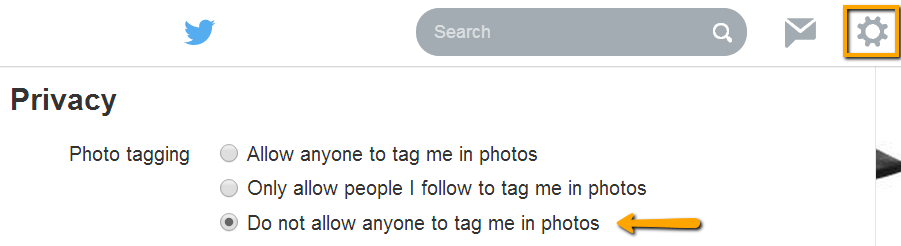
Here you can choose to only allow people you follow to tag you or stop anyone tagging you.
If you decide to allow others to tag you in photos you also have a further option – You can also stop an account from tagging you by blocking the user. Once you have blocked the user, your tagged name or username will no longer be shown on the photo.

 Sue Beckingham






 Social Media for Learning